Kids BMI Calculator
This kids BMI calculator turns a child's age, sex, height and weight into a BMI-for-age percentile from the CDC growth charts. For ages 2 to 19, the 5th to below the 85th percentile is the healthy weight range.
Sources: CDC, WHO Updated
BMI-for-age percentile
59th percentile
Healthy weight 5th to below the 85th percentile
- BMI17.4
- Age and sex10 years 6 months, boy
- Healthy weight range at this ageBMI 14.4 to 19.8
This is in CDC's healthy weight range (5th to below the 85th percentile). A BMI at the 59th percentile is higher than that of about 59 in 100 boys of the same age in CDC's reference group.
- Underweight
- Healthy weight
- Overweight
- Obesity
The numbers above are an example. Change them to see your own result.
A shared link contains the numbers entered here.
For ages 2 to 20. The result is a screening figure, not a diagnosis. It cannot replace the growth record a pediatrician keeps over years.
Why a child's BMI is read as a percentile
A child's BMI is calculated exactly like an adult's: weight divided by height squared. What changes is how the number is read.
Typical BMI values change as children grow, and they change differently for girls and boys. A BMI of 17 is at the 86th percentile for a 4-year-old boy and at the 4th percentile for a 16-year-old boy.
The CDC growth charts solve this by comparing a child with children of the same sex and age. The answer is a percentile: the 60th percentile means the BMI is higher than that of about 60 in 100 children of that age and sex in CDC's reference group.
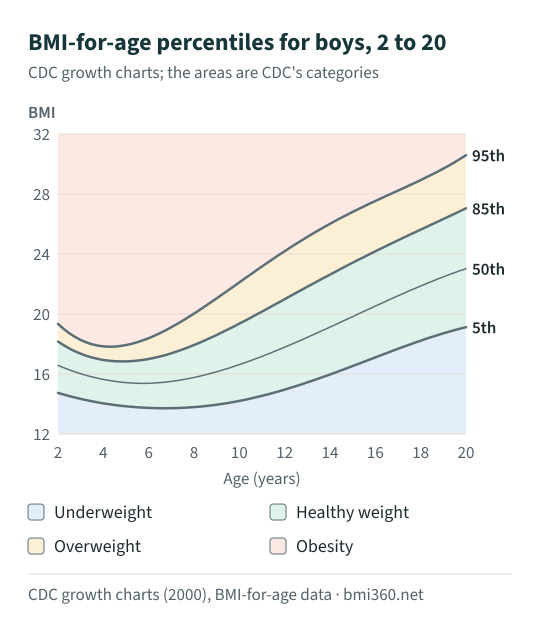
BMI percentile categories for children and teens
CDC uses these categories for ages 2 through 19. From age 20 the fixed adult ranges in the adult BMI calculator apply.
| Category | BMI-for-age percentile |
|---|---|
| Underweight | below the 5th percentile |
| Healthy weight | 5th percentile to below the 85th |
| Overweight | 85th percentile to below the 95th |
| Obesity | 95th percentile or above |
| Severe obesity | 120% of the 95th percentile or more, or a BMI of 35 or more |
The category names are CDC's. They describe where a measurement falls on a chart. They do not describe a child, and they say nothing about effort, habits or health on their own.
How the BMI percentile is calculated
CDC publishes three numbers for every month of age and each sex: L, M and S. M is the median BMI, S describes the spread and L corrects for the fact that BMI is not distributed symmetrically. They turn a BMI into a z-score, and the z-score into a percentile:
z = ((BMI ÷ M)L − 1) ÷ (L × S)
percentile = 100 × Φ(z)
Φ is the standard normal distribution. For BMIs above the 95th percentile CDC published a second method in 2022, the extended BMI-for-age charts. The calculator uses it for those BMIs:
percentile = 90 + 10 × Φ((BMI − 95th percentile BMI) ÷ sigma)
- Data. The L, M, S and sigma values are read from CDC's two published data files, the 2000 growth chart file and the 2022 extended file. They were fetched on October 12, 2026 and stored unchanged; how we calculate lists the checks.
- Age. CDC lists each row at the middle of a month. An age of 10 years 6 months is looked up at 126.5 months.
- Rounding. The percentile is rounded down to a whole number, so the 84.9th shows as the 84th and stays in the healthy weight range, as CDC's limits require.
How to calculate a child's BMI percentile: a worked example
A boy aged 10 years 6 months who is 4 feet 7 inches tall and weighs 75 pounds:
- BMI: 703 × 75 ÷ (55 × 55) = 17.43.
- CDC values for boys at 126.5 months: L = −2.6739, M = 16.9151, S = 0.12366.
- z = ((17.43 ÷ 16.9151)−2.6739 − 1) ÷ (−2.6739 × 0.12366) = 0.233.
- Φ(0.233) = 0.5921, so the BMI is at the 59th percentile.
- That is between the 5th percentile (BMI 14.4) and the 85th (BMI 19.8) for his age: healthy weight.
BMI-for-age table: the 5th, 50th, 85th and 95th percentiles
BMI at the 5th, 50th, 85th and 95th percentile on each birthday, calculated from the CDC data. A BMI between the 5th and the 85th column is in the healthy weight range for that age.
| Age | Boys | Girls | ||||||
|---|---|---|---|---|---|---|---|---|
| 5th | 50th | 85th | 95th | 5th | 50th | 85th | 95th | |
| 2 | 14.7 | 16.6 | 18.2 | 19.3 | 14.4 | 16.4 | 18.0 | 19.1 |
| 3 | 14.3 | 16.0 | 17.4 | 18.3 | 14.0 | 15.7 | 17.2 | 18.3 |
| 4 | 14.0 | 15.6 | 16.9 | 17.8 | 13.7 | 15.3 | 16.8 | 18.0 |
| 5 | 13.8 | 15.4 | 16.8 | 17.9 | 13.5 | 15.2 | 16.8 | 18.2 |
| 6 | 13.7 | 15.4 | 17.0 | 18.4 | 13.4 | 15.2 | 17.1 | 18.8 |
| 7 | 13.7 | 15.5 | 17.4 | 19.1 | 13.4 | 15.4 | 17.6 | 19.6 |
| 8 | 13.8 | 15.8 | 17.9 | 20.0 | 13.5 | 15.8 | 18.3 | 20.7 |
| 9 | 14.0 | 16.1 | 18.6 | 21.0 | 13.7 | 16.3 | 19.1 | 21.8 |
| 10 | 14.2 | 16.6 | 19.4 | 22.1 | 14.0 | 16.8 | 19.9 | 22.9 |
| 11 | 14.5 | 17.2 | 20.2 | 23.2 | 14.4 | 17.4 | 20.8 | 24.1 |
| 12 | 15.0 | 17.8 | 21.0 | 24.2 | 14.8 | 18.1 | 21.7 | 25.2 |
| 13 | 15.4 | 18.4 | 21.8 | 25.1 | 15.3 | 18.7 | 22.5 | 26.3 |
| 14 | 16.0 | 19.1 | 22.6 | 26.0 | 15.8 | 19.3 | 23.3 | 27.2 |
| 15 | 16.5 | 19.8 | 23.4 | 26.8 | 16.3 | 19.9 | 24.0 | 28.1 |
| 16 | 17.1 | 20.5 | 24.2 | 27.5 | 16.8 | 20.4 | 24.6 | 28.9 |
| 17 | 17.7 | 21.2 | 24.9 | 28.2 | 17.2 | 20.9 | 25.2 | 29.6 |
| 18 | 18.2 | 21.9 | 25.6 | 28.9 | 17.5 | 21.3 | 25.7 | 30.3 |
| 19 | 18.7 | 22.5 | 26.3 | 29.7 | 17.8 | 21.5 | 26.1 | 31.0 |
| 20 | 19.1 | 23.0 | 27.0 | 30.6 | 17.8 | 21.7 | 26.5 | 31.8 |
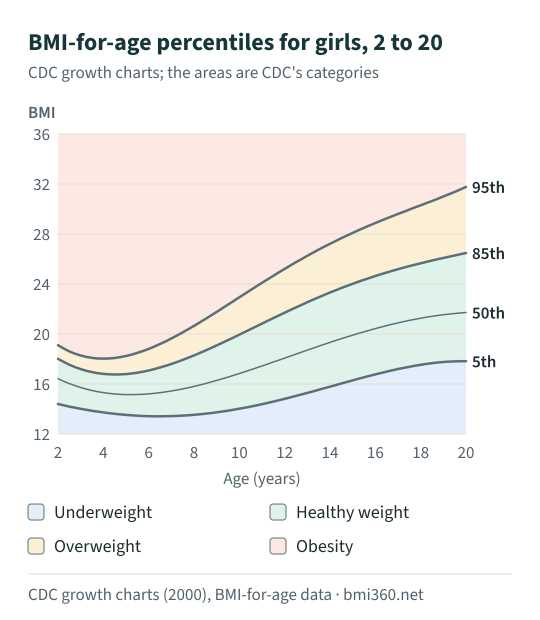
What a BMI percentile cannot tell you
- It is one point in time. A pediatrician looks at how a child's measurements move over years. A steady line along any percentile reads differently from a sudden change.
- It does not measure body fat. BMI cannot tell fat from muscle and bone. That is as true for children as for adults.
- Home measurements are rough. For a 4-year-old boy who weighs 36 pounds, a height of 40 inches gives the 56th percentile and a height of 41 inches the 29th. Measure without shoes, and weigh in light clothing.
- It is a U.S. reference. The charts describe American children. WHO uses a different reference and different cut-offs for ages 5 to 19.
If the result is outside the healthy weight range, the useful next step is a conversation with your child's doctor, who can check the measurements and look at the whole picture. Changes to what a child eats are best planned with that doctor.
Questions about children's BMI
What is a good BMI for a child?
It depends on age and sex, so there is no single number. CDC classes a BMI from the 5th percentile to below the 85th percentile as healthy weight for ages 2 through 19: for a 16-year-old that is a BMI of about 17.1 to 24.2 for boys and 16.8 to 24.6 for girls. Below the 5th percentile is underweight, the 85th to below the 95th is overweight, and the 95th or above is obesity.
What does a BMI percentile mean?
It compares a child's BMI with children of the same sex and age in CDC's reference group. The 60th percentile means the BMI is higher than that of about 60 in 100 of those children. It is a position in a group, not a grade.
Can you use BMI for children?
Yes, from age 2, but not with the adult categories, because children's bodies change as they grow and boys and girls change differently. For a 10-year-old boy the healthy range is a BMI of about 14.2 to 19.4; for a 10-year-old girl it is about 14.0 to 19.9. Most of that range would count as underweight on the adult scale used in the BMI chart.
Which ages does this calculator cover?
Ages 2 to 20. CDC's categories apply to children and teens aged 2 through 19; from age 20 the adult categories are used. The CDC BMI-for-age charts start at age 2, so the calculator does not accept younger ages.
My child's percentile changed since the last check-up. Is that a problem?
One changed number does not say much. Height and weight are hard to measure exactly at home, and small differences in either move the percentile. A pediatrician looks at the pattern over several visits, which this calculator cannot do.
Is this the same as the WHO charts used outside the United States?
No. This calculator uses the CDC growth charts, the U.S. reference. WHO defines overweight and obesity for ages 5 to 19 by standard deviations from its own growth reference, so a calculator built on WHO data can give a different result for the same child.
Sources
- CDC: Child and teen BMI categories — percentile categories for ages 2 through 19, including severe obesity (checked October 12, 2026)
- CDC growth charts: data files (BMI-for-age, 2 to 20 years) — L, M and S values and the percentile formula; data file fetched 2026-10-12 (checked October 12, 2026)
- CDC: Data file for the extended BMI-for-age growth charts (2022) — method and sigma values for percentiles above the 95th; data file fetched 2026-10-12 (checked October 12, 2026)
- CDC: BMI frequently asked questions — the formula in metric and U.S. units, and what BMI cannot show (checked October 12, 2026)
- WHO: Obesity and overweight (fact sheet) — BMI definition; adult overweight is a BMI of 25 or more, obesity 30 or more (checked October 12, 2026)